


Glympse - Share GPS location
4.118.83K Reviews
App Specs
- Version
- 4.0.27
- Updated On
- License
- Free
- Downloads
- 5,000,000+
- Developer
- Glympse, Inc
- Categories
- Maps & Navigation
- Platform
- Android, iOS
Screenshots
 Analysis by AppCompare
I find location sharing most useful when it answers a practical question without turning into a permanent check-in: can someone see that I’m making progress, and can I stop sharing once the trip is over? That is the appeal of Glympse. It is a Maps & Navigation app from Glympse, Inc, built around sending a temporary view of your location rather than asking everyone to keep a shared map open indefinitely. I’d consider it for coordinating a journey, while remembering that a map is a convenience, not a substitute for calling someone when plans change.
Readability and navigation: a focused map, not a control center
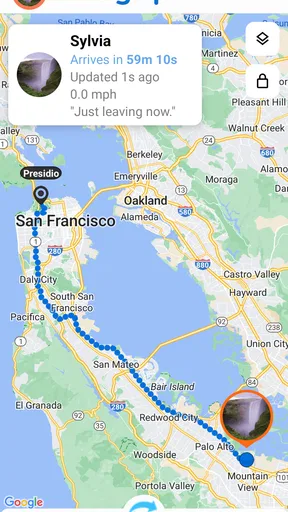
The app’s basic flow is easy to explain: choose a recipient, set how long to share, and send. The person receiving the link can view your location on a map without installing the app, which removes a common obstacle when coordinating with someone who only needs to follow one trip. That makes the experience feel more like a useful handoff than a request for the whole group to adopt another service.
In day-to-day use, that narrow purpose is a strength. You do not have to persuade a friend to create an account just to show them where to meet you. The app is free to download, and its Everyone content rating makes it suitable for a broad audience; in practice, though, a younger user should still share location only with trusted people and with an adult’s guidance where appropriate. The current version is 4.0.27, and the app requires Android 7.0 or later on Android devices.
A location map is only helpful if the recipient can interpret it quickly. I’d send a short accompanying message when the destination is confusing—such as a large venue with several entrances—rather than assuming the moving marker tells the whole story. A live location can show where a phone is, but it cannot explain which door you are waiting by, whether you are inside a building, or why you have paused.
Motor and sensory considerations: fewer steps, but not every barrier disappears
The straightforward sharing sequence can be helpful when someone has limited time or finds complicated setup frustrating. Sending one temporary link is less demanding than asking every person in a group to install an app, make an account, and learn a new interface. That can matter when a friend is already driving, arriving at a busy station, or helping someone who does not use maps often.
There is still a practical safety boundary: nobody should be expected to operate a phone while driving, cycling, or crossing a busy area. I’d set up a share before setting off, or ask a passenger to handle it. For someone with limited dexterity, a small-screen device or difficulty reading maps, the recipient’s ability to open a link is convenient, but the map itself may still require visual attention and touch interaction. I would not treat the app as a hands-free navigation tool.
For sensory needs, it helps to agree on the plan before sharing. A recipient who finds repeated alerts or map checking tiring may prefer one link and a clear arrival message, rather than monitoring a moving marker throughout the trip. Conversely, a person who cannot reliably read texts may benefit from a trusted companion keeping an eye on the shared trip. These are ways to adapt the handoff, not guarantees that the app will suit every access need.
Worth Reading Before You Choose

EA SPORTS FC Mobile 26 Is a Bigger Football Game, but It Takes Time

Flipboard Shows What News Apps Must Do Beyond the Feed

Switching to Android Auto Means Rethinking Your Driving Routine

Google Calendar Makes a Crowded Week Easier to Manage

Ludo King Makes the Most of the Minutes Between Plans

Baby Panda World Brings Quick Play to Modern Phones, but Its Game Library Feels Busy
Situational access: useful when plans involve movement
A realistic use is meeting a friend at a crowded train station. Instead of exchanging a stream of “I’m near the entrance” messages, I can share a temporary location while walking from the platform. The friend can check whether I am approaching and choose a sensible place to wait. If the station has several levels or poor indoor positioning, I’d still name the platform or entrance in a text; the map is a guide, not a precise description of the meeting point.
For a family road trip, temporary sharing can reduce the urge to send progress updates every few minutes. One person can share the journey with relatives expecting them, and the recipient can check the link when useful. This is especially handy when the people waiting do not want another app on their phones. It is less suitable if everyone needs continuous, long-term visibility of one another, since the app’s central idea is limited-duration sharing rather than an always-on family map.
There is also a useful distinction between “where I am” and “when I’ll arrive.” A location link can help someone follow movement, but I would avoid promising that it provides a guaranteed arrival time or a precise account of traffic and delays. If a delivery or appointment is time-sensitive, I’d pair sharing with a direct message when the schedule changes. That small habit prevents a recipient from treating an old estimate or a stationary marker as a complete update.
Remaining barriers: privacy, battery, and the limits of a moving dot
Temporary sharing gives the sender control over how long a Glympse remains visible, which is a sensible privacy feature. The trade-off is that you need to choose a duration that fits the trip. Too short, and the recipient may lose the view before you arrive; too long, and your location stays available longer than necessary. I’d set a realistic window with a little room for delays, then share again if the journey changes substantially.
Location sharing also depends on the phone being able to report its position and connect. A weak signal, a device left behind, or a phone that runs out of power can make the view less useful. I would not rely on it as an emergency service or as proof that someone is safe. For an important trip, agree on a backup such as a call or a specific check-in time, especially if the person being followed may pass through areas with unreliable reception.
One point worth considering before sending a link is the recipient. Sharing with a person who needs to coordinate a pickup is different from forwarding the link into a broad group chat. Even temporary visibility is personal information, so I’d select the smallest audience that solves the problem and avoid treating a location link as a casual public update. If the intended recipient is not comfortable with maps or links, a simple text or phone call may be clearer.
Who will get the most from it?
I think Glympse fits people who need to share a journey now and then without asking every recipient to join the same platform. It is a practical choice for meeting friends, letting family follow a drive, or keeping a colleague informed during an errand. Its average rating is 4.1 from around 115,000 ratings, and it has been installed over 5 million times, so it is not an obscure tool—but those figures do not tell you whether its temporary approach matches your own habits.
Compared with the usual alternatives, the main question is whether you want a one-off link or an ongoing shared-location arrangement. A messaging app may be more convenient if you are already chatting with the person and only need a quick update. A map service with persistent sharing may be better for households that deliberately want to see one another over longer periods. Glympse is appealing when you want to avoid asking someone to install an app and want sharing to have a defined end, but it is not automatically the best fit for continuous family tracking or turn-by-turn navigation.
There are in-app purchases priced from $1.49 to $199.99 per item, so I would check the purchase details in the app before buying anything. The basic proposition is easy to understand without assuming that every feature or use case is included at no cost. If your only need is occasional coordination, start with that simple task and decide whether the app’s options add value for you.
Using Glympse in everyday coordination
Ever been in a situation where you’re trying to meet up with friends, and nobody knows where the other is? Or maybe you’re on your way to a family gathering and everyone’s asking where you are. Here’s where Glympse comes into play. This app is all about making those "where are you?" moments a thing of the past. Let’s dive into what makes Glympse a must-have on your phone.
Getting Started with Glympse
First things first, downloading and setting up Glympse is a breeze. Available for both Android and iOS, you just hit that download button, and voila, you’re ready to roll. The app doesn’t require any sign-ups or log-ins, which is a huge relief. You just open it up, and you’re greeted with a straightforward interface.
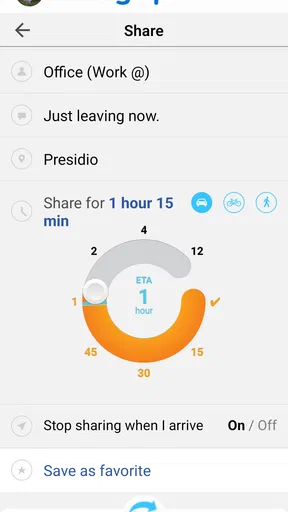
To start sharing your location, you simply select your recipient, decide how long you want them to track you, and hit send. The recipient doesn’t even need to have the app installed. They’ll receive a link that takes them to a map showing your location in real-time. It’s like sending a live map of where you are.
Features that Stand Out
Let’s talk about the features because Glympse packs some nifty ones. One of my personal favorites is the ability to set a timer for how long your location is visible. Privacy is a big deal, right? So, having control over who sees your location and for how long is fantastic.
The app also allows for group sharing. Imagine you’re organizing a group outing; you can send a Glympse to multiple people at once. Everyone’s on the same page, literally.
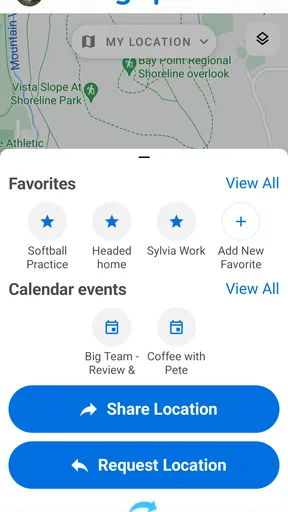
Another cool feature is the integration with your calendar. You can schedule Glympses to automatically send when you’re on your way to an event. It’s like having a personal assistant that keeps everyone informed.
User Experience and Interface
I can’t stress enough how user-friendly this app is. The interface is clean, with no clutter to confuse you. Everything is where you expect it to be. The map is responsive and updates in real-time, which is crucial for an app that’s all about sharing your location.
The app’s design is intuitive, so even if you’re not tech-savvy, you’ll find it easy to navigate. The buttons are big and clearly labeled, so there’s no second-guessing which function does what.
When to Use Glympse?
So, when does Glympse shine the most? Well, anytime you’re on the move and want others to know your location, it’s perfect. Think about road trips, marathons, or even just meeting up with someone in a crowded area.
It’s also great for business purposes. If you’re a delivery driver or running errands for work, sharing your location can keep clients and colleagues updated without constant calls or texts.
Final Thoughts
At the end of the day, Glympse is an app that solves a common problem with simplicity and efficiency. Its focus on privacy and ease of use makes it a standout in the realm of location-sharing apps. Whether for personal use or professional purposes, it’s an app worth having on your device.
And there you have it, folks. If you’re tired of typing out "I’m 5 minutes away" texts, give Glympse a try. It’s more than just an app; it’s peace of mind, knowing you’re always just a Glympse away from those who matter.
An inclusive fit, with sensible expectations
For me, the strongest inclusive aspect is not a claim about accessibility; it is the low-friction sharing arrangement. A recipient can follow a link rather than install the same app, and the sender can keep the sharing window finite. That can make coordination easier across different phones, comfort levels, and app habits. It also gives the sender a clear moment to think about who needs the information and for how long.
I would skip it if I needed a dedicated navigation aid, persistent location history, or a dependable safety monitor. It is also not ideal when someone cannot comfortably use a map and has no helper available, or when the trip depends on reliable connection throughout. In those cases, a phone call, a familiar messaging app, or a navigation service designed for the specific need may be a better choice.
My practical tip is to test the whole handoff on an ordinary, low-stakes trip: send a link to someone you trust, confirm they can open it, and see whether the chosen sharing duration covers the journey. That checks the part that matters most—the sender’s setup and the recipient’s ability to use the result—before a crowded pickup or time-sensitive appointment. I’d also agree on what to do if the marker stops moving, so neither person mistakes a connection issue for a change of plan.
Overall, I see Glympse as a useful, focused option for temporary location sharing, especially when recipients should not have to install another app. Its simplicity is valuable, but maps can be hard to interpret in complex places, and a live marker cannot replace clear messages or a backup plan. If you use it with a specific audience, a sensible time limit, and realistic expectations, it can make everyday meetups less stressful without turning location sharing into an all-day habit.
Pros
- Real-time location sharing is seamless.
- No sign-up required for quick use.
- Works cross-platform with minimal setup.
- Battery consumption is efficient.
- Temporary sharing ensures privacy.
Cons
- Limited features without internet connection.
- Notifications can be overwhelming.
- No built-in navigation features.
- Sharing duration can't exceed four hours.
- Interface may seem outdated to some users.
FAQs for Glympse - Share GPS location
What is Glympse and how does it work?
Glympse is a location-sharing app that allows users to share their real-time GPS location with friends, family, or colleagues for a specified duration. It works by sending a link via text, email, or social media, which the recipient can open to view the sender's live location on a map without needing to sign up or download the app.
Is Glympse safe to use in terms of privacy and security?
Yes, Glympse is designed with privacy and security in mind. Users have full control over who they share their location with and for how long. The app doesn’t require creating an account, and location sharing is temporary, automatically expiring after the set time, ensuring your location is not shared indefinitely.
Can I use Glympse without an internet connection?
While Glympse requires an internet connection to send and receive location updates, it does use GPS to track location. Therefore, if your device is temporarily offline, it will update your location once a connection is re-established. However, continuous internet access ensures the best real-time tracking experience.
What are the main features of Glympse?
Glympse offers several key features, including real-time location sharing, the ability to set a duration for sharing, integration with calendars for meeting coordination, and a user-friendly interface that requires no sign-up. It also supports sharing across multiple platforms and devices, making it versatile for various needs.
Is Glympse available for both Android and iOS devices?
Yes, Glympse is available for both Android and iOS platforms. Users can download it from the Google Play Store for Android devices and the Apple App Store for iOS devices. The app is free to download, providing an accessible way for users to share their location across different operating systems.


